
Artwork and printing
Learn about artwork specifications, accepted file formats, print methods, colour requirements, proofing, and preparing files for the best possible result.
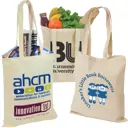
Does printing a tote bag on both sides cost more?
Yes, because the back is a separate print job with its own setup and its own pass through the press. It's usually worth it for retail bags and staff gifts, where the bag is carried both ways round and both sides get seen. For exhibition giveaways, a single side on the front is normally enough.
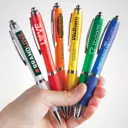
What artwork do I need for a printed pen?
A vector file, such as an AI, EPS, PDF or SVG, ideally with a one colour version of your logo. If you only have a JPEG or PNG, upload it anyway, because our in-house designers can often clean it up or redraw it as part of the Visual Proof™ process.
Should I print or engrave my logo on a pen?
Print when you need colour, and engrave when you want a permanent, understated mark on a metal pen. Laser engraving removes a thin layer of the coating to show the metal beneath, so it's a single tone that can't rub off. It shows up best on darker or coloured barrels.
What colour pen should I choose for my logo?
Choose a barrel your logo contrasts with, such as a dark logo on a light barrel or a light logo on a dark one. Frosted and clear barrels change how a print looks, so check them on a Visual Proof™. The writing ink is a separate choice, and many pens write in black only.
Will a detailed logo print well on a pen?
Usually only in a simplified form. A pen's print area is long and narrow, so thin lines, small text and gradients can close up or disappear at that size. Use a simplified or one colour version of your logo, or choose a pen with full colour printing if the colours matter.
Where should my logo go on a promotional pen?
On most pens, along the barrel, where the longest print area is. Some pens print alongside the clip and some offer a full colour wrap around the barrel, so check the print position on the product page, and request a Visual Proof™ to see how it looks.
Should I use a local print shop or an online promotional merchandise supplier?
Use a local print shop for small quantities of a simple product, quickly, especially if you want to see and handle the item before ordering or you value dealing with somebody in person. Use an online promotional merchandise supplier when you need a range of different products, better pricing at volume, published minimums and delivery dates, or sourcing and compliance handled for you. The decision turns on how many products are in the order rather than on how big the order is.
Can I print a message as well as my logo?
Yes. The 210 x 380mm print area on the bamboo fan is large enough for a campaign line, an event name or a date alongside your logo. Request a free Visual Proof and you'll see the layout at actual size before you order.
What is the best print method for t-shirts?
It depends on the fabric more than the design. Screen printing suits cotton and larger runs and is priced per colour. Direct to garment suits cotton and short runs with detailed or multi-colour artwork, because there is no screen setup. Transfer works across cotton, polyester and blends, which makes it the practical choice when one order covers different garments. Sublimation works only on light-coloured polyester. Vinyl is the route when every shirt carries a different name or number.
Why does a white print on a dark t-shirt turn pink?
That is dye migration. On polyester and poly-cotton garments the dye in the fabric can move into the ink sitting on top of it, usually under the heat of curing or later in the wash, and a light print on a red or navy shirt gradually takes on a tint of the garment colour. It is prevented by printing a blocker underbase beneath the design, by using low-cure inks, or by choosing 100% cotton for dark garments carrying a light print. Tell your supplier the garment colour when you brief the job so the method is chosen around it.
Does the date account for the time I take to approve my proof?
Your own approval time counts towards your deadline, because nothing goes into production until you've signed off your Visual Proof. Proofs come back within 20 minutes during working hours, so the fastest thing you can do is decide in advance who approves it.
How long does it take to get a quote?
If you send a complete brief with artwork, quantity and deadline, we can usually turn around a quote the same day. Incomplete briefs take longer because we need to come back to you for missing information.
Can I make changes after approving the proof?
Once the proof is approved and the order is in production, changes are not possible without stopping the run, which may affect your lead time and cost. If you spot something after approval, contact us immediately and we'll tell you where the order is and what options are available.
What if I do not have brand guidelines?
Send what you have. A logo file and your preferred colours are enough to get started. If you are unsure about placement or sizing, we'll make a recommendation in the proof and you can adjust from there.
What file format do I need for my artwork?
Vector files (AI, EPS or PDF) give the cleanest results for most branding methods. If you only have a JPEG or PNG, send it over and we'll tell you whether the resolution is sufficient. If it needs redrawing, we'll let you know before anything goes to production.
Can I see a proof before the order goes to print?
Yes. You'll receive a free digital proof within 20 minutes of sending your artwork. Nothing goes into production until you've approved it.
Can I see a proof before the order goes into production?
Yes. You'll receive a free digital proof within 20 minutes of sending your artwork. Production only starts once you've approved it.
Is engraving more expensive than printing on a pen?
An engraved pen usually costs more than a printed plastic pen, mainly because engraving is offered on metal pens, which cost more before any branding. Engraving itself is a single process with no ink colours to add. Compare the two at your quantity on the product pages to see the difference.
Does a two colour logo cost more to print on a pen?
On screen and pad printed pens, yes, because each colour has its own setup and its own pass. Pens with full colour printing apply the whole design in one process, so extra colours don't add passes. The product page shows which methods each pen offers.
How do you choose branded merchandise that means something rather than just carrying a logo?
Start from what you want the item to say rather than from what you can afford to print on. Basically, pick something your audience would want even without the branding, then brand it well.
What is Pantone matching and do I need it for branded merchandise?
Pantone matching means mixing ink to a numbered colour reference so a brand colour prints consistently across products and orders. You need it when your logo is screen or pad printed in spot colours. It matters less for full colour printing, which gets close but can't always match exactly, and for embroidery and engraving, which use thread shades or no colour at all.
Our logo prints badly on dark fabric. What can we do?
Ask for a white underbase, which is a base layer printed beneath the colours so they stay bright on dark fabric, or switch to embroidery, where the thread colour stays true on any garment. On polyester and poly-cotton, dye can move into light inks over time, which needs a print designed to block it. Check the design on the actual garment colour on your Visual Proof™ before you approve it.
Which branding method lasts the longest?
Laser engraving and embroidery are the most durable because neither relies on ink sitting on the surface: engraving marks the material itself and embroidery stitches thread into it. Screen and digital printing on hard items such as mugs and bottles also last well when properly cured, while prints on clothing can crack or fade after many washes.
What is the difference between screen printing and embroidery for branded clothing?
Screen printing applies ink on top of the fabric, while embroidery stitches the design into it with thread. Screen printing suits bold designs, large print areas and bigger orders, and it's priced per colour. Embroidery gives a raised, hard wearing finish that suits smaller logos on polo shirts, caps and jackets, and it's usually priced on stitch count.
What should I check on a proof before approving it?
Check the spelling of every word, including web addresses, then the logo version and colours, the size and position, the product colour and quantity, and the branding method. Check the price and delivery date too, and make sure whoever has to sign it off has seen it, since changes after approval are what hold orders up.
How do I get merchandise branded when I only have a JPEG of the logo?
Upload the largest, clearest JPEG or PNG you have when you request your Visual Proof™. Our in-house designers can often clean it up or redraw it as part of the proof process, and the proof shows you how it'll look before you order. Avoid small images saved from emails or screenshots of your website, which are usually too low in resolution.
What is a setup or origination charge?
It's the one off cost of preparing your artwork for production, covering things like making the screens, digitising a design for embroidery and matching ink colours. It's charged per design rather than per item, which is why the price per unit falls as quantity rises. Reordering the same design later is usually cheaper because that preparation has already been done, and splitting one order into two normally costs more because you pay to set up twice.
Which cover material works best for a debossed logo?
A soft-touch PU or leather-look cover, because debossing needs a material flexible enough to hold an impression. Cloth-bound hard covers also take it well. A rigid printed card cover will not deboss cleanly, which is the most common reason a notebook proof comes back looking wrong. If you have set your heart on a card cover, foil blocking or print will give you a better result than a deboss.
What is the difference between debossing, embossing and foil blocking on a notebook?
Debossing presses the design into the cover so it sits below the surface. Embossing raises it above the surface. Both are colourless, so the logo reads as a texture rather than as a coloured mark. Foil blocking presses coloured foil into the cover, usually gold, silver or copper, so the design is clearly visible. Combining a deboss with foil gives you a recessed design filled with colour, which is the most premium finish available on a notebook cover.
What if I don't have a logo and just want text?
No problem. You don't need a logo to get a Visual Proof™. Just tell us the text you'd like on the product when you request your proof, along with any preferences for the font or style.
If you're not sure how it should look, leave it to our design team. They'll create something that works well with the product and branding method you've chosen, and you'll be able to see it on your Visual Proof™ before you order.
What if my logo won't work well on the product I've chosen?
Our designers will check your logo against the product, colour and branding method when they create your Visual Proof™. If we think it could work better another way, we'll show you the options. That might mean using a single-colour version of your logo, changing the branding position or choosing a different product colour.
You'll see how it looks on your Visual Proof™ before you decide whether to order.
Can I change a Visual Proof after I've seen it?
Yes, as many times as you need. Just click ‘Request Changes’ on your Visual Proof™ and tell us what you'd like changed. Your request goes directly to our design team, who'll make the changes and send you an updated proof.
Changes are completely free and unlimited until you're happy and ready to order.
Can you match a giveaway to my event artwork rather than just my logo?
Yes, and it makes a visible difference. For the 187 & Park festival our design team sourced the event's own flyer so the fan design matched the festival rather than just carrying a name. Send us your event artwork alongside your logo and say what the event looks like, and you will get a closer proof back.
What happens if my logo has Pantone colours?
When you request your Visual Proof, provide your Pantone colour references and we’ll use the exact codes. If you’re unsure of your Pantone colours, our Pantone-matching system will find the closest available match, which is then checked by our in-house experts. For digital or full-colour printing, Pantone references are used as a guide. Although an exact match may not always be possible, we’ll get it as close as we can. We’ll show you how it will look on your Visual Proof for you to check before production starts.
Do I need different artwork for different branding methods?
The base requirement is the same: a vector file (AI, EPS or PDF) for most methods. Digital printing can also work from high-resolution raster files. The key difference is complexity: embroidery and engraving work best with clean, simple logos. Digital printing handles complex artwork well.
Which branding method lasts the longest?
Laser engraving and embroidery are the most durable because they alter the material itself rather than applying ink on top. Screen printing and digital printing on hard goods (mugs, bottles) are also very durable when a proper curing process is used.
Can I use more than one branding method on the same product?
Sometimes, yes. The branding options available will be clearly shown on the product page before you request your Visual Proof. For example, a hoodie used as workwear could have an embroidered logo on the front and a screen-printed design across the back. However, for most products with branding in multiple positions, we keep things simple by using the same branding method throughout.
What file format do I need for my artwork?
We accept all common artwork file formats. Vector files such as SVG, AI, EPS or PDF usually give the best results, but don’t worry if you don’t have one. JPEGs and PNGs are absolutely fine too.
Simply upload the best version of your logo you have and our in-house design team will check it and take care of the rest.
I’m having trouble or getting an error when uploading my logo, what do I do?
No problems simply upload your logo via the online Support Centre – select the Presales tab.
Can you print a QR code on my product?
Yes, we can! However, to ensure the best results, we recommend only using QR codes on flat surfaces like paper, notebooks, coasters, or keyrings, where they scan easily. For curved or textured items like bags, mugs, bottles, or pens, QR codes may not perform as reliably. Please provide a high-resolution PNG, JPEG, PDF or vectored EPS for the QR code when you initially ‘upload your artwork’. Keep in mind that once you have approved your Visual Proof™, we cannot guarantee its functionality on the final product.
I have exact Pantones™ for my brand that I want to use, is that ok?
Yes, when you first request your Visual Proof™ just let us know what these Pantones™ are, we’ll make sure your Visual Proof™ is setup with these Pantone™ colours. Your Visual Proof™ will clearly state the print colours used before you approve and buy. If they need changing, this can be done via the 'Request Design Changes' button on your Visual Proof™.
Can I print individual names?
No, we don’t offer that service, all items in a single order must have the same design.
Can my logo print larger on the product?
Our design experts add your logo for best effect which usually means it is placed as big as possible to the product’s maximum print area. If adjustments are needed, simply use the 'Request Design Changes' button on your Visual Proof™. It’s simple and Free!
What if I request a Visual Proof™ outside working hours?
Visual Proofs™ requested outside our working hours will be processed first thing the next business day.
Do you keep my artwork on file?
Yes, simply log in and your previously uploaded artwork will be in the ‘upload your logo’ slider uploader for future use.
Can I save money by printing text only?
No, pricing is based on colour counts, so a single-colour logo and text design cost the same.
Will my logo print clearly?
Absolutely! Our in-house team ensures your design looks its best by converting it into a sharp, print-ready format. Rest assured that every design undergoes thorough quality checks before printing.
Is there a limit to the file size I can upload?
Yes, you can upload a maximum of 4 files at a time to a maximum size of 30MB
What’s the difference between CMYK and Pantone colours?
CMYK stands for Cyan, Magenta, Yellow and Black. The four colours are combined to produce full colour prints, just like a domestic printer. It is used for digital and transfer printing as it offers a vibrant print alternative for photos and images with lots of colours and shading in.
Pantone™ colours ensure precise colour matching for screen or pad printing, ideal for brand consistency. Think of a Pantone™ colour like a colour sample card you'd get at a DIY store when choosing a paint colour. Every Pantone™ colour has a specific code or name which ensures it's comes out the same, whatever the product is. The majority of our products use the Pantone™ Solid Coated palette.
What printing processes do you use?
We offer various printing methods, including screen printing, pad printing, engraving, debossing, full colour, and foil blocking, depending on the product. It will state in the product overview which method is used.
How do I make changes to my design?
You can request unlimited free design changes until you're completely satisfied before placing your order. However, this can only be done via the Request Design Changes button on your Visual Proof™, our design team will handle it quickly and efficiently!
What file formats do you accept?
We accept any files but recommend high-resolution PNG, JPEG, AI, EPS, or PDF files. You can upload up to four files at a time. Our design team will showcase your logo and design on your selected products on your Visual Proof™