
See Stock Levels Before You Order Promotional Products
Every product page on hotline.co.uk shows the number of units we're holding, so you can check availability against the...
Every product page on hotline.co.uk shows the number of units we're holding, so you can check availability against the quantity you need before you commit to anything.


Related topics
View allFinding the right product, uploading your logo and getting approval, only to discover there isn’t enough stock available, is frustrating, particularly when you’re working towards a deadline.
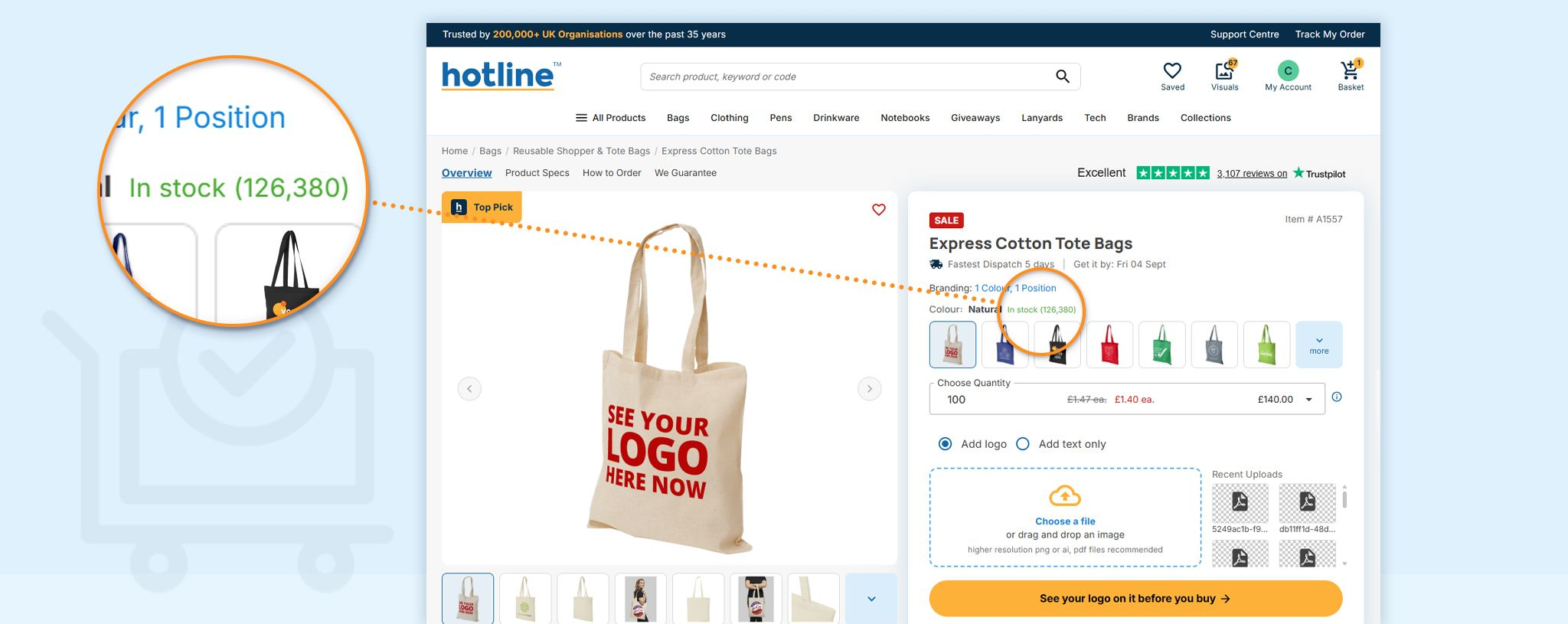
At Hotline, you can check availability from the start. Every product page clearly shows whether an item is in stock or out of stock. For most products, we also display the number currently available, so you can quickly check there is enough stock for the quantity you need before requesting a Visual Proof™ or placing your order.
Some products are made to order and are always available, so an exact stock quantity isn’t shown. For clothing and other products with different options, you can check availability by size or colour.
Where stock is shown
You can see current stock availability on the product page, close to the price and minimum order quantity. It is also clearly shown on your Visual Proof™, so you can check availability alongside your branded product mock-up and quote.
You’ll usually see one of two messages:
In stock (33,950) means we're holding that many units.
Low stock (16 left) means the number is getting short, and it tells you exactly how short.
For most products, we display the exact quantity available rather than a tick or a vague ‘in stock’ message. If you need 250 units and only 240 are available, you’ll know before placing your order. Some products are made to order and always available, so these will show as ‘in stock’ without an exact quantity.
For clothing, stock availability is shown by size and colour and can be found using the Size Guide link.
Stock on clothing, size by size
Clothing is where availability catches people out, because a garment can be well stocked overall and short in the two sizes half your team wears.
Here is how the Urban Women's Hoodie reads today:
| Size | Availability |
|---|---|
| S | In stock (40) |
| M | In stock (32) |
| L | Low stock (16 left) |
| XL | Low stock (6 left) |
| 2XL | Low stock (15 left) |
If you were ordering 30 hoodies for a team, that table tells you in one glance that small and medium are comfortable, that large is tight, and that XL needs a conversation. It also points at the practical lesson: collect sizes from your team before you order rather than after. Guessing the size split and finding out later that you needed nine XLs is one of the most common ways a clothing order gets held up.
The Urban Women's Hoodie has a minimum order quantity of 5, which means small teams can order clothing at all. Minimums are set per product rather than by blanket policy, and they range from 5 units on some clothing up to 100 on printed sweets.
Stock and speed are different questions
It's worth keeping these apart, because people often assume that in stock means fast.
Stock tells you whether the blank product exists today. The delivery date on the same page tells you when the branded product reaches you, and that includes the time it takes to print. A product can be sitting in a warehouse in its thousands and still take ten working days, because the printing has to happen either way.
The two figures work together. Stock tells you whether your quantity is achievable at all. The delivery date tells you whether it's achievable in time. Our guide to guaranteed delivery dates covers how that date is worked out.
If you're working to a fixed event date, look at both numbers on the page before you get attached to a product. Our branded hoodies and sweats range is a good place to see size-level stock in action, and the tote bags range shows what deep stock looks like on a high-volume product.
What to do if there’s no stock or not enough available
If your chosen product is out of stock or there aren’t enough units available, browse the relevant category to find a similar alternative.
You can see the available stock for each product as you browse. Once you’ve found an option with enough stock for your order, request a free Visual Proof™ to see exactly how it will look with your logo.
If you’re also working to a deadline, use the delivery date filter on the category page to show only products that can arrive by the date you need.
Get notified when a product is back in stock 🚨
If the product or colour you want is unavailable, check the product page for its expected restock date. You can also enter your email address into the Back in stock alert box, and we’ll let you know as soon as it becomes available again.
There’s no need to keep checking the website, and you can request your free Visual Proof™ once the stock has arrived. If you can’t wait, browse the relevant category to find a similar product that’s already available.