

Why Your Logo Prints Badly on Dark Fabric, and How to Fix It
The four reasons a logo looks dull, patchy or pink on navy and black clothing, the fix for each, and how to check your logo on a dark garment before you order.

Related topics
View allA logo usually prints badly on dark fabric for one of four reasons: the ink needs a white base layer to show up, the garment's dye is coming through a light ink, the logo has fine detail or dark colours that lose contrast, or the branding method doesn't suit the fabric. Each one has a simple fix. At Hotline, our in-house designers check your logo against the garment colour and the branding method when they create your free Visual Proof™, so it's sorted before anything is printed.
This guide takes each cause in turn, then covers what to send and how to see your logo on a dark garment before you order.
Why do colours look dull or patchy on a dark garment?
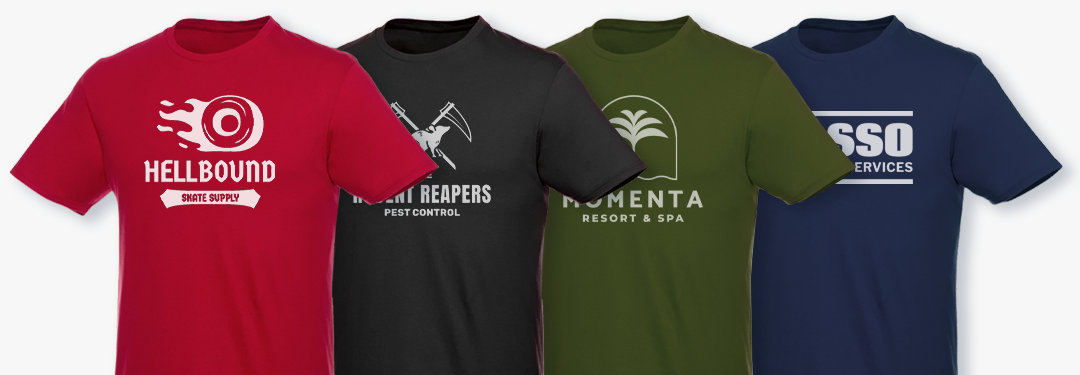
Printing inks are partly see-through, so on navy, black or charcoal the dark fabric shows through and the colours look flat. The fix is a white underbase, a base layer printed beneath the colours so they stay bright on dark fabric.
It's a standard step for printing light or bright colours on dark clothing, and it's the reason a logo on a black hoodie can look as crisp as it does on a white t-shirt. Our artwork and printing FAQs cover it in the answer on logos and dark fabric.
Why has a white logo turned pink or grey?
That's dye migration. On polyester and poly-cotton garments, the dye in the fabric can move into the light ink sitting on top of it, so a white print picks up a pink or grey tint.
It's prevented in three ways: a blocker underbase printed under the design as a barrier, low-cure inks that set at a lower temperature, or a 100% cotton garment when you want a light print on a dark colour. Our guide to printed t-shirts in bulk explains it in more detail, fabric by fabric.
Why has the detail disappeared?
Fine lines, thin text and dark brand colours lose contrast on a dark garment. Navy on black, dark green on navy and small lettering are the usual culprits, because there isn't enough difference between the logo and the fabric for the eye to pick out.
There are three easy fixes:
- A single-colour or reversed-out version of your logo, usually in white or a light brand colour, which reads clearly on any dark fabric.
- A lighter colour from your brand guidelines, where your guidelines allow one.
- A larger print area, so fine detail has room to show. The print positions and areas for each garment are on its product page.
Would embroidery work better?
Often, yes, on hoodies, fleeces, jackets and polos. Embroidery stitches your logo in thread, so the colour stays true on any fabric and there's no ink for the garment to show through.
The thing to watch is fine detail, because very thin lines and small text don't translate well into stitches. Our guide to the difference between screen printing, embroidery and engraving compares the two for clothing, and each of our clothing product pages names the branding method it uses.

What should you send when ordering dark garments?
Send your logo as a vector file if you have one, such as a PDF, Adobe Illustrator (.ai), SVG or EPS file, with the text outlined. These give the best print quality, although we can work with a high resolution JPEG, PNG, GIF or TIFF file too.
It also helps to send:
- a single-colour or white version of your logo, if you have one
- your Pantone references, so your brand colours are matched (our guide to Pantone matching explains when it matters)
- the garment colour you've chosen, so the proof is made on that colour
If you've mocked up your design with an AI image tool, send it as a layout reference alongside your actual artwork, so our designers can create your Visual Proof™ accurately.
How do you see it before you order?
Request a free Visual Proof™ on the garment colour you've picked. Our in-house designers usually send it back in around 20 minutes during working hours, showing your logo on that colour in the branding method the product uses, with the price for your quantity and the delivery date.
If another version of your logo or a different garment colour would work better, our designers will suggest it. You can ask for as many changes as you need, and nothing is printed until you approve it.
Logo problems on dark fabric at a glance
| Problem | Why it happens | The fix | What to ask for on your Visual Proof™ |
|---|---|---|---|
| Colours look dull or patchy | Ink is partly see-through on dark fabric | A white underbase beneath the colours | Your logo shown on the exact garment colour |
| A white print has turned pink or grey | Dye migration on polyester and poly-cotton | A blocker underbase, low-cure inks or a 100% cotton garment | Confirmation of the fabric and branding method |
| Fine detail or text has disappeared | Not enough contrast with the fabric | A single-colour or reversed-out logo, a lighter brand colour or a larger print area | A white or light version of your logo |
| Brand colours don't look right | The fabric changes how the ink reads | Pantone references, or embroidery in matched thread | Your Pantone references and the colours used |
| The print doesn't suit the garment | The method doesn't match the fabric | Embroidery on hoodies, fleeces, jackets and polos | The branding method named on the product page |
To start, browse our Branded Hoodies & Custom Sweats, printed t-shirts and Branded Jackets, and request a free Visual Proof™ on the dark colour you have in mind. If you're ordering for a whole team, our guide to organising company hoodies covers collecting sizes.